
For you and your family
Your server, your settings, shared access.
Personal plansfrom $4.58 / mo
Your VPN. Your server. Your rules.
15-day refund
Keep your personal subscription while joining multiple companies.
Your server, your settings, shared access.
Personal plansFrom 5 VPN servers. Work profiles, members, groups and routing packages.
Business plansVPN on your smartphone — connect in one tap, pick a protocol and location, and manage everything with ease. One account across all your devices: full control and settings right in the app. Download on Google Play or the App Store.




The repository resolves dependencies for you and keeps the packages updated with the rest of your system. Everything in it is signed with our key.
Debian, Ubuntu
curl -fsSL https://meduzavpn-builds.fra1.digitaloceanspaces.com/repo/meduzavpn-archive-keyring.asc \
  | sudo gpg --dearmor -o /usr/share/keyrings/meduzavpn.gpg
echo "deb [signed-by=/usr/share/keyrings/meduzavpn.gpg] https://meduzavpn-builds.fra1.digitaloceanspaces.com/repo/deb stable main" \
  | sudo tee /etc/apt/sources.list.d/meduzavpn.list
sudo apt update
sudo apt install meduzavpn-desktop   # the app
sudo apt install meduzavpn           # command line and service only
Fedora, CentOS, RHEL
sudo rpm --import https://meduzavpn-builds.fra1.digitaloceanspaces.com/repo/meduzavpn-archive-keyring.asc
sudo tee /etc/yum.repos.d/meduzavpn.repo >/dev/null <<'REPO'
[meduzavpn]
name=MeduzaVPN
baseurl=https://meduzavpn-builds.fra1.digitaloceanspaces.com/repo/rpm
enabled=1
gpgcheck=1
repo_gpgcheck=1
gpgkey=https://meduzavpn-builds.fra1.digitaloceanspaces.com/repo/meduzavpn-archive-keyring.asc
REPO
sudo dnf install meduzavpn-desktop   # the app
sudo dnf install meduzavpn           # command line and service only
The desktop package includes the VPN service. Ubuntu/Debian: sudo apt install ./meduzavpn-desktop_*.deb. Fedora/CentOS/RHEL: sudo dnf install ./meduzavpn-desktop-*.rpm.
All builds on GitHub — with checksums and the signing key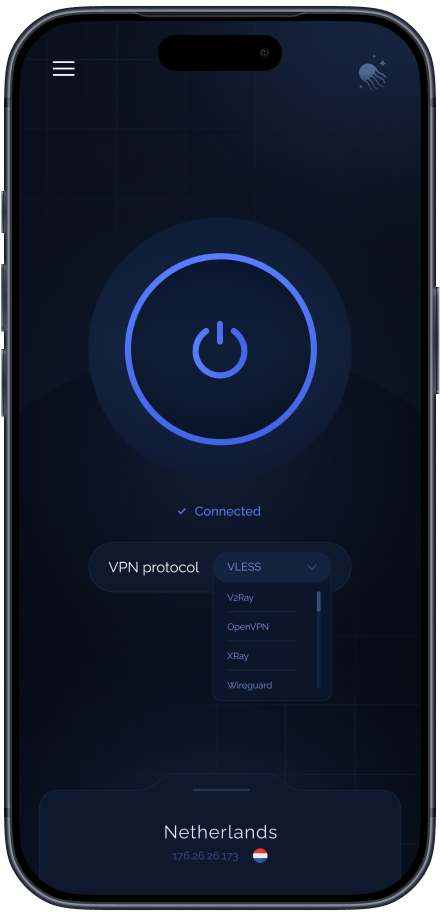
Televisions
A television connects the same way a phone does, and the sign-in is approved from your phone with a QR code — nothing is typed on the remote.
MeduzaVPN is available on Android TV and Google TV through Google Play. For Fire TV and devices without Google Play, download the APK from our website. It is the same app as on your phone, with an interface designed for a remote control.
Android TV — Google PlayFire TV / Android TV without Google Play .apkInstalls from the store or from the file. Sign in with the QR code on the television screen: scan it with your phone, approve, and nothing has to be typed on the remote.
The native Apple TV app is available in the App Store with MeduzaVPN ULTRA.
Apple TV — App StoreRequires tvOS 17 or newer. Scan the QR code with your phone or enter the TV code at meduzavpn.com/link, sign in to your MeduzaVPN account and approve Apple TV. Then choose your VPN and connect.
Routers
A router covers the whole house at once: everything on the network goes through it — set-top boxes, consoles, televisions, smart appliances. Set it up once and no device needs an app of its own.
The full daemon: every protocol, MeduzaVPN ULTRA included. Plus a page in the router's web interface to set it all from.
Built for OpenWrt 24.10. Three targets, the ones with enough flash: a router with 8–16 MB cannot fit the daemon, and there plain WireGuard remains the option.
The full daemon (MeduzaVPN ULTRA, AmneziaWG 3.1, Hysteria 2, VLESS 2.0) and a standalone web dashboard on port :2222 (like awg-manager): QR sign-in, URL subscriptions, and split routing by domains, countries, and LAN devices.
opkg update && wget -qO- https://meduzacore.com/download/keenetic-install.sh | shInstalls with one command in Entware SSH onto a USB drive or internal storage — stock Keenetic firmware support for AWG 3.1 is not required. Dashboard opens at http://192.168.1.1:2222.
The same daemon as plain files, for a router on an unusual target, a NAS or a single-board computer. No package manager needed.
ULTRA runs on a router's 32-bit processors too — verified on mips, mipsle, arm and arm64.
RouterOS accepts no third-party packages — only MikroTik signs them. So for MikroTik we hand over a ready RouterOS 7 script instead: interface, keys, routes, rules and DNS already filled in for your service.
Built-in WireGuard only: RouterOS installs no third-party packages, so ULTRA is not available on MikroTik. ULTRA on a router means OpenWrt.
A router counts as an ordinary device. It is not billed separately, and the number of devices is not limited.
MeduzaVPN is the official personal VPN service running on your own server. If you were looking for MeduzaVPN or Meduza VPN, you are on the service's official site. Here you can choose a plan and a VPN location, download the app for Windows, macOS, Android, iOS and Linux, or set up a connection with configuration files for other devices.
The service is operated by IPFB LLC. You can read more about the project, legal information and official channels on the page with official information about MeduzaVPN.
Your personal VPN server
Connect through the MeduzaVPN app or a compatible client. Traffic routed through the VPN uses your server’s public IP.
Server locations
A VPN protects the connection. It does not grant access rights, change content licences or replace a subscription. Follow each service’s terms of use.
SPLIT TUNNELING · ONE CONNECTION, YOUR OWN ROUTES
Connect to a single VPN location and let rules decide the rest. Russian sites can leave from your Frankfurt VPN, European ones from New York, and your work network can skip the VPN entirely — all at once, from one connection.
OUR OWN PROTOCOL · BUILT IN-HOUSE
Most services resell the same handful of public protocols and depend on how quickly someone else's project ships fixes. MeduzaVPN is our own connection mode: we develop, test and improve it ourselves for our customers.
IPV6 READY · AND UNDER YOUR CONTROL
Your VPN carries IPv6 next to IPv4 wherever the location supports it, so modern IPv6-only services stay reachable through the tunnel. And it is a switch, not a fixed setting: turn IPv6 on or off for each VPN separately, from the app or from your account.
IPv6 availability depends on the location of each VPN. If a VPN has no IPv6 yet, its switch says so rather than pretending to work.
See VPN locations
You fully control your data. Personal VPN browsing history is not shared with a company workspace. For work VPNs, the owner can enable destination logging and network activity analysis; the app explains this before connection.

The corporate log covers connections through the company VPN only. It excludes messages, passwords, HTTPS contents and full page URLs. Resource categories and minutes with network activity do not measure exact working time.

When connecting, the client generates a new key and a new security certificate and sends it to the server


 Maximum: only you use the IP, reduces the risk of surveillance
 Share IP with hundreds of usersHigh: you don't share traffic with anyoneMay drop due to server overloadA clean IP that isn't shared with strangersIP address often in blacklistsFull customization for your tasksLimited settingsHigh connection stabilityStability may decrease under high loadCan be used with friends or familyShare access with family and friends via config files
Your own VPN, device access and sharing built into the app. Figures for other services come from their own pages.
| What is compared | MeduzaVPNthis is us | NordVPN | ExpressVPN | Surfshark | Proton VPN | AmneziaVPN |
|---|---|---|---|---|---|---|
| Your own server and IP | PERSONAL: always a server nobody else is on | Shared IP, personal costs extra | Shared IP | Shared IP, personal costs extra | Shared IP | Your own server, your own hands |
| Device access | There is no limit on the number of devices, including ULTRA. | Up to 10 | Up to 14 | No limit | Up to 10 | Up to 7 |
| Sharing with family | Built in: a link or QR, revocable any time | No | No | No | No | No |
| Traffic and speed | Bandwidth is shared by your connected devices | Unlimited, shared line | Unlimited, shared line | Unlimited, shared line | Unlimited, shared line | Unlimited, shared line |
| Protocols | 13, two of them ours | NordLynx, OpenVPN, NordWhisper | Lightway, OpenVPN | WireGuard, OpenVPN, IKEv2 | WireGuard, OpenVPN, IKEv2, Stealth | AmneziaWG, XRay VLESS Reality |
| Our own protocol | MeduzaVPN ULTRA and MeduzaVPN | NordWhisper | No own protocol | Camouflage | Stealth | AmneziaWG |
| Changing location and IP | In the app, at no extra cost | Another shared server | Another shared server | Another shared server | Another shared server | Rebuild it by hand |
| Paying from Russia | Russian cards, SBP, crypto | No Russian cards | No Russian cards | No Russian cards | No Russian cards | Yes |
| Support in Russian | Assistant in chat 24/7, team by email | English only | English only | English only | English only | Yes |
Figures for other services come from their official sites and were checked on 17 September 2026. Prices are left out on purpose: they depend on the term, the country and whatever promotion is running, so any number here would go stale before it was useful.
A detailed comparison with Amnezia VPN and AmneziaWG →Your own VPS and modern encryption — your traffic stays separate from others.
Modern protocols help you stay connected even on unstable and congested networks.
More than thirty countries and regions — pick where your server runs.
Get configuration files and QR codes to connect through any compatible VPN client.
Within the first 15 days, tell us the reason and get a full refund.
On the PERSONAL plan, every VPN in your subscription is a personal server that nobody shares with you. One subscription can hold from 1 to 20 of them, each in its own location.
15-day refund
Full refund on requests made within 15 days with a reason provided
60+ locations included
Switch location anytime at no extra cost
Multiple payment methods
14 ways to pay: international and Russian cards, SBP, SberPay, T-Bank, YooMoney, MIR Pay, UnionPay, Apple Pay, Google Pay, Samsung Pay, PayPal, stablecoins and 50+ other coins
Partner programme
Send your link. Whoever signs up through it stays yours for good: you get 30% of their first payment and 10, 15 or 20% of every payment after it, depending on how many people you have brought. Withdraw the money, or spend it on your own VPN.
Worked out from our own prices and the current rates. Pick the plan your invitees are on and see what each number of people brings in over the first year and over every year after.
| Paying invitees | First → later | First year | Each year after |
|---|---|---|---|
| 1 | 30% → 10% | $8.39 | $7.19 |
| 10 | 30% → 15% | $116.81 | $107.82 |
| 50 | 30% → 15% | $584.03 | $539.10 |
| 100 | 30% → 20% | $1497.50 | $1437.60 |
This is arithmetic, not a promise: the table assumes every invitee keeps paying on the chosen plan without a break. In practice some leave, some pick a different term, some buy several VPNs. Read the figures as the ceiling for that number of invitees.
Built by us
Proven standards
Maximum compatibility: they connect from anywhere, routers and the system's built-in VPN included.
When the network is unstable
They run over TCP with TLS encryption — a fallback when a plain tunnel connects unreliably.
| Protocol / technology | Windows | macOS | Linux | Android | iOS | Routers |
|---|---|---|---|---|---|---|
| MeduzaVPN | ||||||
| MeduzaVPN ULTRA | ||||||
| WireGuard | ||||||
| OpenVPN | ||||||
| VLESS | ||||||
| VLESS 2.0 | ||||||
| Xray | ||||||
| V2Ray | ||||||
| Hysteria 2 | ||||||
| Shadowsocks | ||||||
| Outline VPN | ||||||
| SOCKS5 proxy | ||||||
| IKEv2/IPsec | ||||||
| SoftEther |
Conditional support requires a third-party client, a legacy OS version, or compatible router firmware.
Use VPN for Windows to protect your connection while working, gaming, and streaming on your PC. Install the native MeduzaVPN app for Windows and sign in to connect to your personal server, with a stable connection and no traffic volume limits.
Use VPN for macOS to protect personal data and work sessions on your Mac. Connect to your own VPN location and keep stable performance in daily tasks.
Install the MeduzaVPN app for Linux — desktop or command line, as .deb and .rpm packages — and connect to your own server. Configuration files for compatible clients stay available too. Great for developers, server workflows, and secure remote work.
Install VPN for Android and connect to your personal server in just a few steps. Protect traffic on mobile networks and public Wi-Fi with simple in-app controls.
Use VPN on iPhone and iPad via the official MeduzaVPN app or via config/QR in supported clients. Get a secure and stable connection at home and while traveling.
Up to 400 Mbps
server link capacity
Actual speed depends only on your internet connection and how far the server is from you.
No problem — tell us the reason and get a full refund within the first 15 days!


Elena M.
«Works on all my devices right away: laptop, phone, tablet. No extra hassle.»
Daniel W.
«Fair price, no issues with speed, plenty of servers for any task. One minor wish — I'd love more detailed connection and traffic stats in the app. It would also be nice to get push notifications when the connection drops. Doesn't affect the core functionality, overall happy and not planning to switch.»
Irene L.
«Took it on trial after a bad experience with another service. Everything works the way it should: stable connection, decent speed even in the evening, and payment went through without any hassle. I used to be skeptical about services like this, but now I recommend it to friends without hesitation. I'll be staying for the long run.»
Artem K.
«Got connected in a couple of minutes, no complex setup. Stable both at home and while traveling, speed is consistently high across every device.»
Olivia S.
«Got it for my mom — she's always worried about scammers. The service has its own app, so there was nothing to configure manually: installed it, signed in, and it just works.»
Whether you're at home, traveling, or working remotely — a personal VPN keeps your connection private, stable, and fully under your control.
Travel
A protected connection when travelling: in hotels, airports and cafés. A personal VPN server encrypts traffic from your banking apps and accounts and keeps the connection stable.
Public Wi-Fi protection
Coffee shops, airports, hotels — open networks are easy targets. Your own VPN encrypts all traffic and shields your passwords, messages, and personal data from interception.
Streaming & entertainment
Enjoy fast and stable connections to your favorite streaming platforms and media services. On the PERSONAL plan, your own VPS keeps speeds high because the server's channel isn't shared with strangers.
Remote work & study
Connect to corporate resources, cloud tools, and university networks securely. A personal VPN provides a trusted encrypted tunnel that meets professional security standards.
Online shopping & banking
Protect your payment details and financial accounts from tracking and fraud. A private server ensures your transactions stay confidential and your IP remains hidden.
Gaming & low-latency access
Reduce ping, choose optimal routing to game servers, and protect against DDoS attacks. Your own VPS gives you a direct, stable connection to game servers worldwide.
If the App Store or Google Play won't link your card, the purchase hangs or fails and the trial never started, take the same 7 days without payment on the website — the VPN will appear in the app too:
The trial is one per account. It is not offered if the account has already paid or had a trial in the App Store or Google Play, and it does not combine with a promo code. A failed attempt in the app where the store set nothing up does not use up the trial. If the “7 days without payment” box is missing, you can pay right away — the 15-day refund applies. Still stuck? Write to support or ask Mia.
 Windows
 macOS
macOS Linux
Linux Android
 Routers